
Free bodyshop quote template
Five quick steps: your bodyshop, the customer and vehicle, the work, the terms, and a PDF with your logo. It adds up parts, labour, paint and VAT for you, marks every part genuine, matching quality or used, and shows the excess on insurance jobs. Free, no sign-up.
Works on your phone. Nothing is uploaded.
Quote maker
Make your bodyshop quote
Your bodyshop's details are remembered on this device, so next time you start straight at the customer. Want to see one first? Press See an example.
Loading the builder...
What's on the quote
Everything a bodyshop quote needs
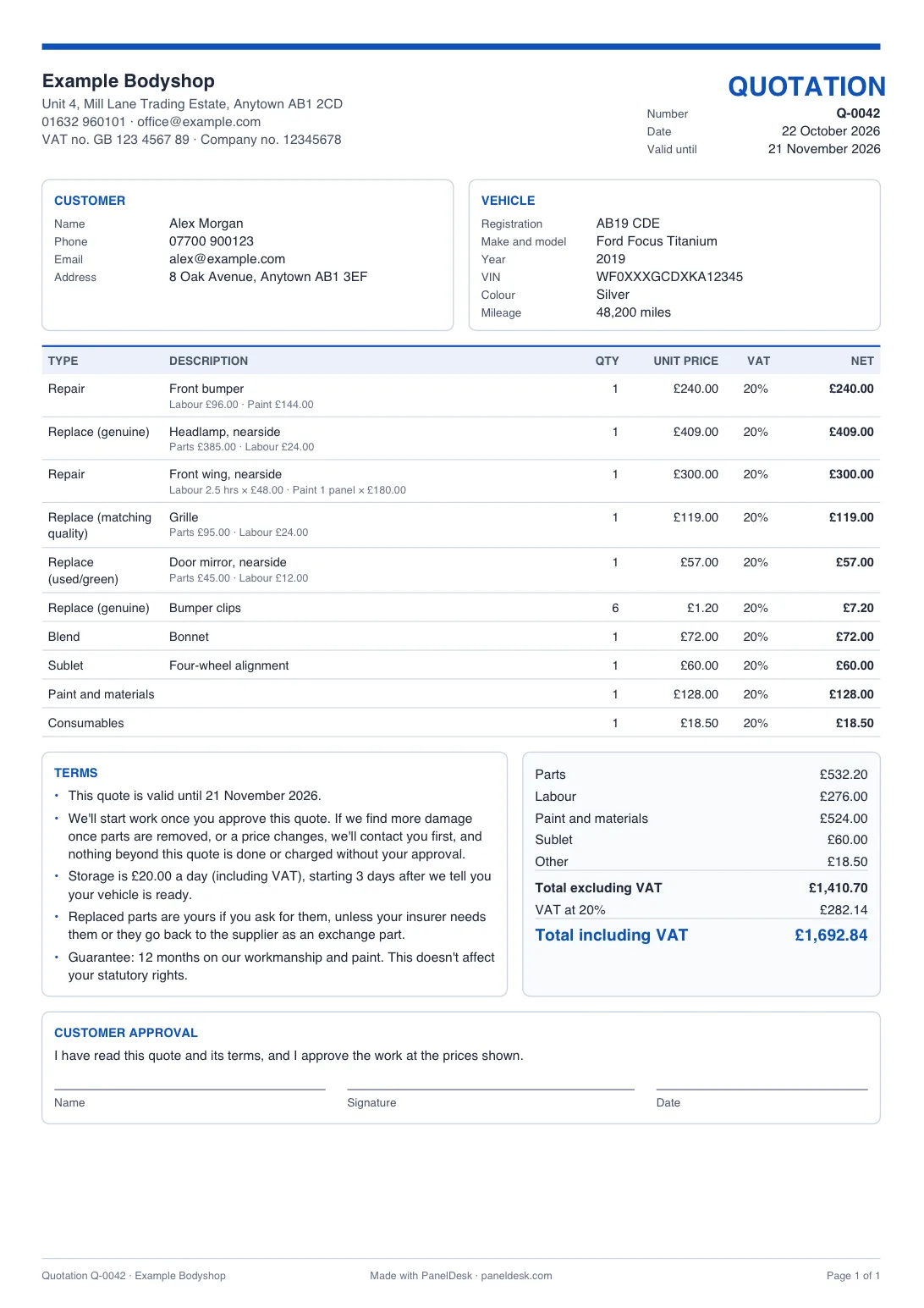
Laid out like the quotes PanelDesk bodyshops send every day, on A4.
Lines the way you price
Break each line into parts, labour, paint and sublet, work labour out by the hour and paint by the panel at your own rates, or give it one price.
VAT at 20%, done for you
The total excluding VAT, the VAT and the total including VAT, worked out after any discount. Not VAT registered? Tick one box and there's no VAT at all.
Genuine, matching quality or used
Each line prints its type, such as Replace (genuine), Replace (matching quality) or Replace (used/green), so the customer and the insurer see which parts you'll fit.
Insurance jobs and the excess
The insurer, claim number and engineer, with the excess the customer pays and the balance due from the insurer.
Clear terms and a signature
How long the quote stands, no extra work without approval, any strip-down fee, storage, replaced parts and your guarantee, then the customer's approval.
Your logo and numbering
Your logo, details, rates and quote numbers are remembered on your device, so the next quote takes a minute.
Quotes your customers approve online
In PanelDesk you build quotes with your own rates and line types, send them as a secure link with photos attached, see when the customer opened them, and an approved quote becomes the job card, then the invoice, without retyping.
Good practice
What a good repair quote covers
The template does these for you. They protect your bodyshop in a dispute as much as they protect the customer.
Get approval before you start
Have the customer sign the quote, or note how and when they approved it, before any work starts. On an insurance job, wait for the insurer's go-ahead too.
Ask before going over
Found more damage once the car's stripped, or a part costs more? Contact the customer, and the insurer on a claim, explain the extra cost, and wait for approval before you carry on.
Say upfront what the quote costs
If you charge for a quote, or for the strip-down it takes to find hidden damage, tell the customer the fee before you start.
Name the parts you'll fit
Mark each part as genuine, matching quality, used (green) or reconditioned. Customers ask, and insurers often say which parts they'll pay for.
Show prices with VAT
If you're VAT registered, give private customers the total including VAT, so the price they see is the price they pay.
Put storage in writing
If you charge storage when a finished car isn't collected, say on the quote how much it is and when it starts.
This is a guide, not legal advice. If you add your own guarantee, the quote says it doesn't affect the customer's statutory rights.
Prefer a file?
Quote template in Word, Excel or PDF
The same layout and terms on A4, to fill in on your computer or by hand, with your bodyshop's details and logo already on them.
Put your details on the templates
Add your bodyshop's name, contact details, VAT number and logo, and every file below has them filled in. They stay on this device.
Excel
A quote spreadsheet that adds up the lines, the VAT, the excess and the insurer's balance for you. Opens in Excel, Google Sheets and Numbers.
Word
The same quote as a Word document. Word doesn't add up, so work out the totals yourself or use the builder above.
Blank to print
A blank A4 quote with lines to fill in by hand, the same terms, and room for the excess and the insurer's balance.
Job done? Use the free bodyshop invoice template, or turn your quote into an invoice from the builder above.
FAQ
Bodyshop quote questions
Quick answers about quotes and the free template.
Yes. Make as many quotes as you like, with no sign-up. Each PDF has a small "Made with PanelDesk" line at the bottom.
If you're VAT registered, yes: the quote shows the total excluding VAT, the VAT at 20% and the total including VAT, so a private customer sees the price they'll actually pay. If you're not VAT registered, tick Not VAT registered and no VAT appears anywhere.
That's up to you, but say so on the quote. Parts and paint prices move, so many bodyshops keep it to 30 days or less. Set it under This quote, and the quote prints the date it runs out.
A quote is usually taken as a fixed price for the work it describes, while an estimate is a best guess. Either way, say what could change the price: the template's terms say you'll contact the customer before doing or charging for anything beyond the quote.
Stop and contact the customer, and the insurer on a claim. Explain the extra work and what it costs, and carry on only once it's approved. Put it in writing, as a supplementary quote.
Yes. Turn on Insurance job to add the insurer, claim number, policy number, engineer and the excess. The quote shows the excess the customer pays and the balance due from the insurer. Insurers have their own rules for quotes, so check what yours needs. When the job is done, Turn this quote into an invoice makes the invoice.
Pick the line's type: Replace (genuine), Replace (matching quality), Replace (used/green) or Replace (reconditioned). The type prints beside every line, so the customer and the insurer can see which parts aren't new genuine parts.
Yes. Switch a line to By the hour and enter the labour hours and the paint panels with your rates. Your rates are remembered for the next line and the next quote. Or type each amount yourself, or give a line one price.
Set the line's quantity, like 6 for six clips, and enter the price for one. The quote shows the quantity, the unit price and the line total.
No. The quote is made in your browser. Your bodyshop's details, logo and rates are saved on your device only, so your next quote starts with them, and the quote itself is cleared when you close the tab. You can clear everything with Forget my details.
Yes, below the builder, along with a blank A4 PDF to fill in by hand. Add your bodyshop's details and logo, and they're already on all three. The Excel version adds up the lines, the VAT and the insurer's balance; in Word you work out the totals yourself.
PanelDesk
From quote to invoice without retyping
PanelDesk keeps every quote, job card and invoice together, follows up open quotes for you, and turns an approved quote into the job card and invoice without retyping.
- Customers approve quotes online
- Automatic follow-ups on open quotes
- Quote, job card and invoice in one place
30 days free. No card, nothing to install.