
Job costing software for body shops that closes the job at the right number.
Manage final costing with clear labour, parts, and extras breakdowns, correct insurer and customer splits, excess handled properly, approvals captured, and a branded final costing PDF — so you can invoice with confidence.
No credit card needed to start. Cancel any time.
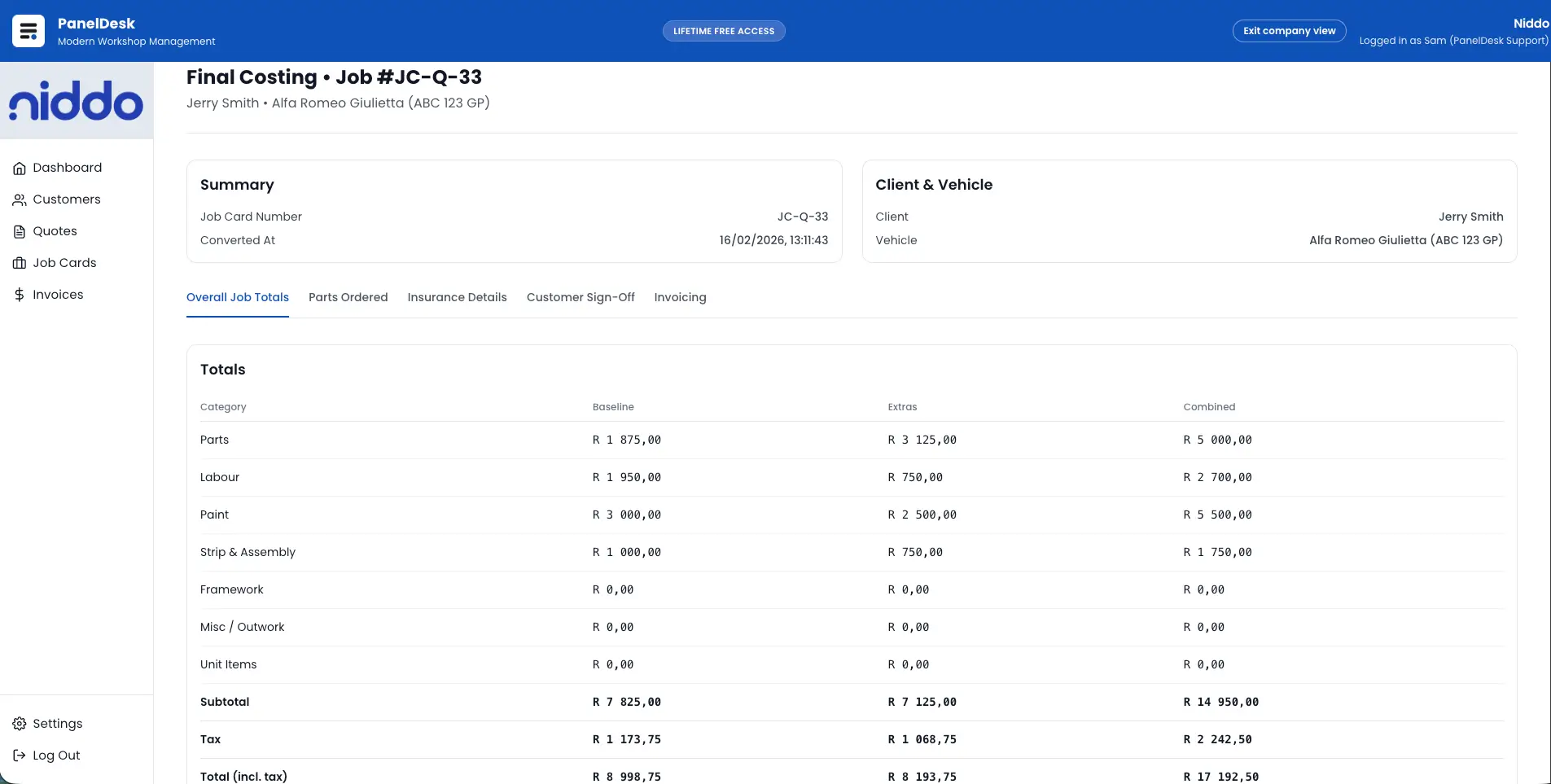
Costed off the real job
Labour, parts, and extras totals reflect the job as completed rather than the original estimate, so nothing is invoiced on a guess.
Insurer and customer, settled early
Split amounts and excess are configured per payer on the job, so who owes what is clear long before billing time.
Invoicing with nothing retyped
Approved costing totals and scope carry into the invoice, so the same numbers run end-to-end.
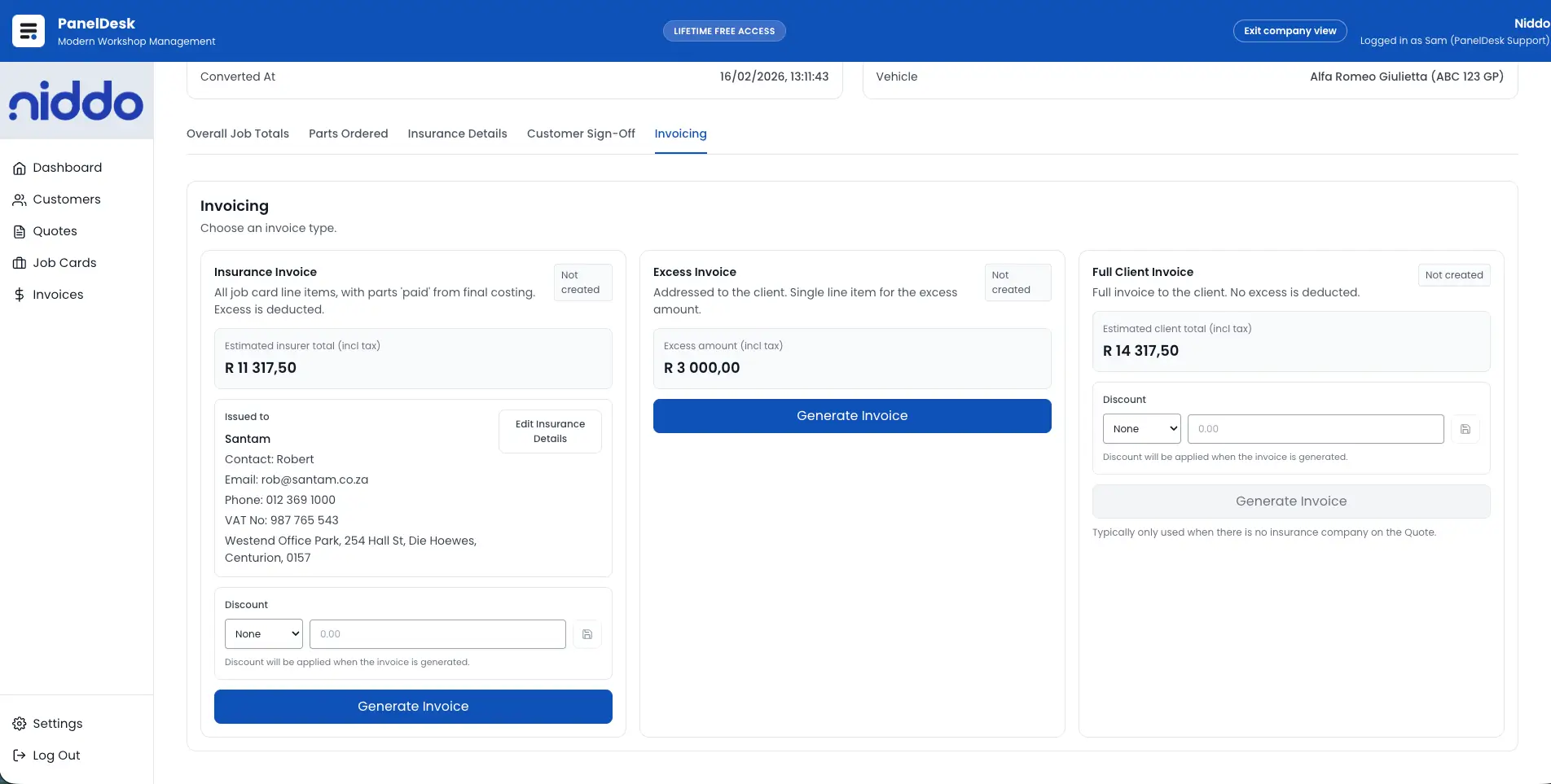
Split the bill between insurer and customer
Insurance versus customer split costing runs inside the one final costing flow, with values configured per payer so the invoice outputs are accurate.
- Support insurance versus customer split costing in one final costing flow.
- Configure values per payer so invoice outputs are accurate.
- Run insurer-focused workflows without a generic invoicing process.
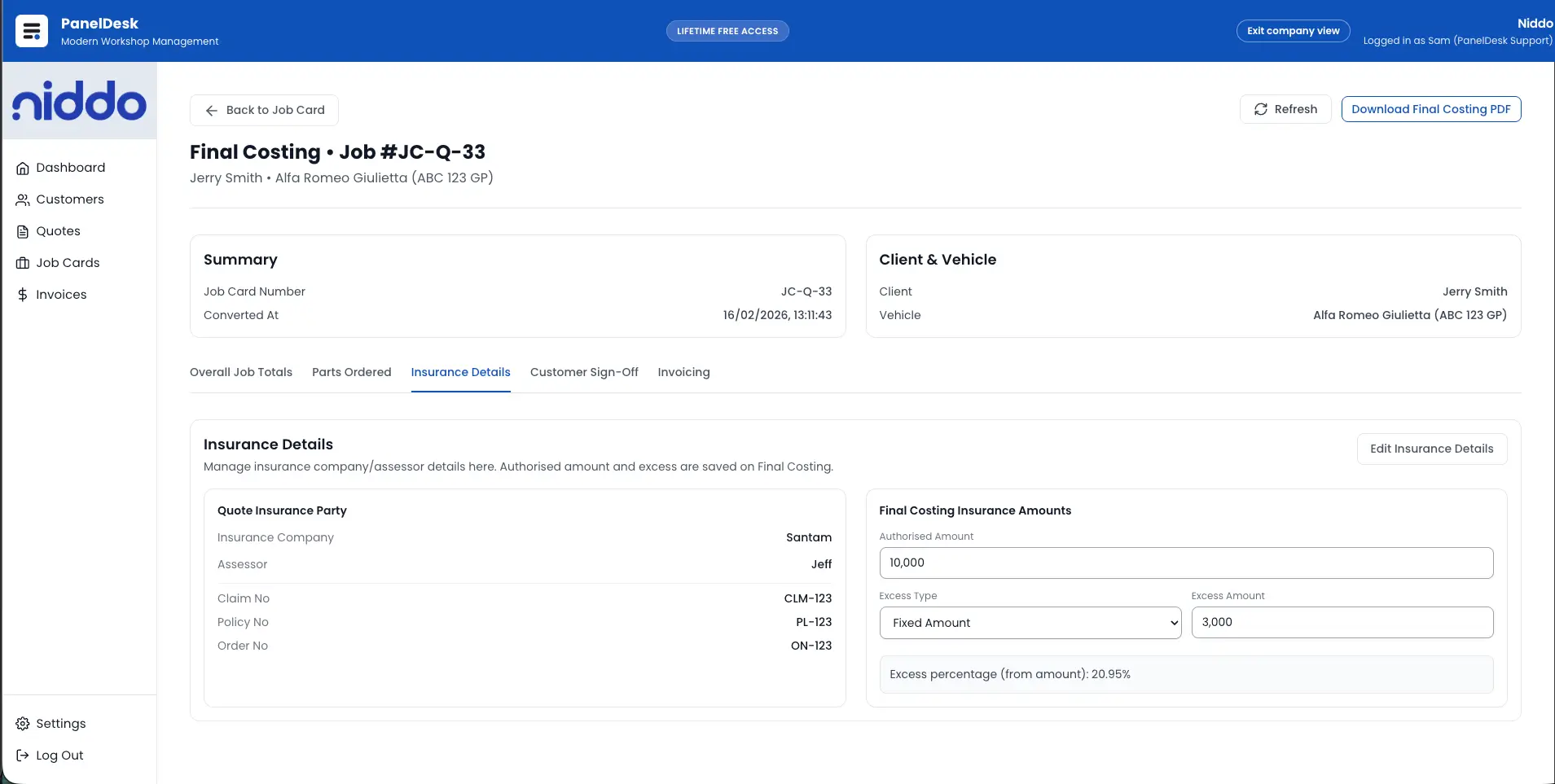
Excess handled where it belongs
Excess is set on the job during costing instead of being remembered at invoicing, covering full client, insurance, and split responsibility.
- Handle excess in final costing, not as an afterthought at invoicing.
- Support client, insurance, and split responsibility scenarios.
- Keep excess logic linked to the job so it is not missed at billing.
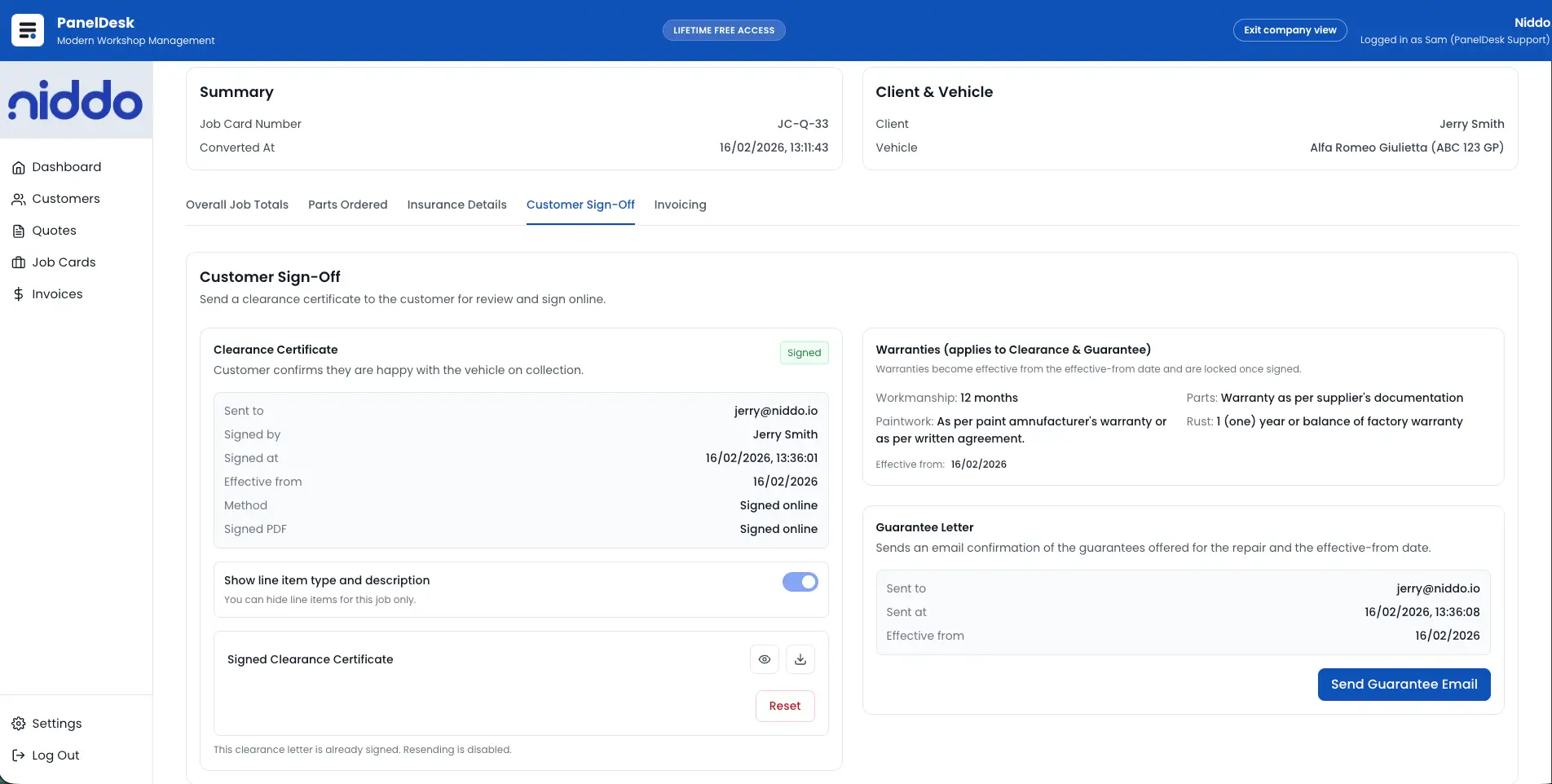
Get it signed off before you invoice
Configure what has to be approved, capture the customer's acknowledgement, and move on from a clear approved state.
- Configure approval and sign-off requirements for final costing.
- Collect customer acknowledgement before the next financial step.
- Use a clear approved state to reduce disputes and delays.
Hand over a proper document
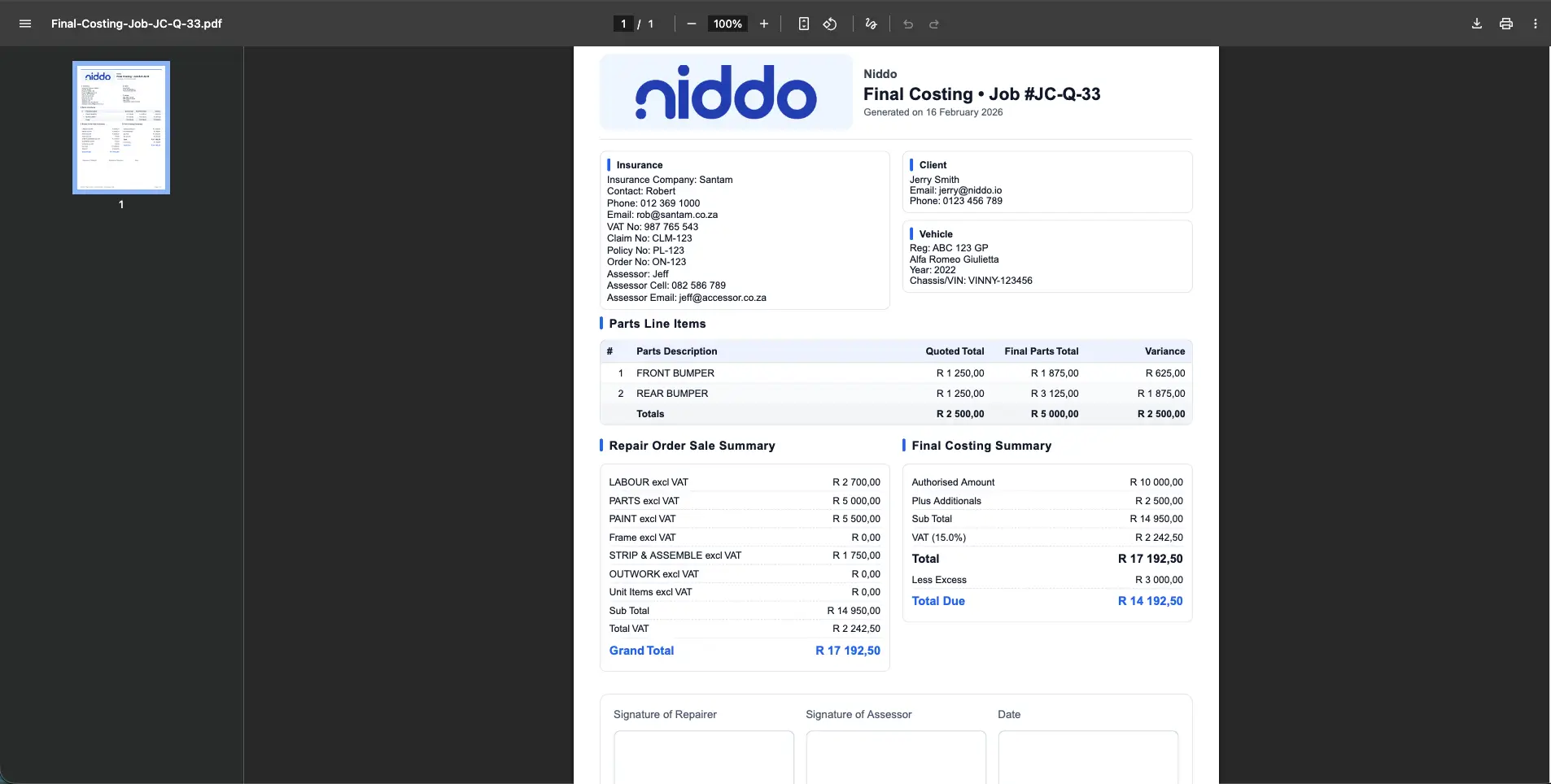
A branded Final Costing PDF comes straight off the job, so customers and insurers get the same clean documentation every time.
- Generate a branded Final Costing PDF directly from the job.
- Produce clean documentation for customer and insurer requirements.
- Standardise final costing documents across the workshop.
How it runs
From completed work to invoice-ready accuracy
Capture the completed job reality
Compile final labour, parts, and extras so the costing reflects actual completed work instead of estimate assumptions.
Configure payer responsibility
Set insurer and customer splits, including excess allocation, so responsibility is clear before invoicing.
Approve and document
Apply sign-off requirements, confirm approved state, and generate a branded final costing document for records.
Handoff to invoicing
Pass final costing outputs into invoicing so totals, scope, and payer amounts remain consistent end-to-end.
In detail
Job Costing Software for Body Shops capabilities
Costing the completed job
- Generate a clear final costing snapshot of labour, parts, and extras.
- Keep totals aligned to the job as completed, not the original guess.
- Include parts pricing directly in the final costing breakdown.
- Reflect real parts costs in totals instead of assumptions.
- Reconcile completed work against the original quote baseline.
Insurer splits and excess
- Support insurance versus customer split costing in one final costing flow.
- Configure values per payer so invoice outputs are accurate.
- Run insurer-focused workflows without forcing a generic invoicing process.
- Handle excess directly in final costing instead of afterthought invoicing.
- Support full client, insurance, and split responsibility scenarios where applicable.
- Keep excess logic linked to the job so it is not missed at billing time.
Sign-off and timing
- Configure approval and sign-off requirements for final costing.
- Collect customer acknowledgement before proceeding to the next financial step.
- Use a clear approved state to reduce disputes and approval delays.
- Support effective-date handling for final costing events.
- Track the right timing and state when costing is completed after workshop work.
- Maintain clean records for operational and documentation consistency.
Warranties and documents
- Include warranty and guarantee handling inside final costing.
- Control warranty line items, including what is included and excluded.
- Keep warranty terms aligned with final documents handed to customers.
- Generate a branded Final Costing PDF directly from the job.
- Produce clean documentation for customer and insurer requirements.
- Standardise final costing documents across the workshop.
Handover to invoicing
- Carry costing totals through to invoicing without manual recapturing.
- Tie final costing directly to the job workflow for continuity.
- Move into invoicing with totals and scope already aligned.
- Reduce downstream errors by using costing outputs as invoice inputs.
Walkthrough
See it in action
FAQ
Job Costing Software for Body Shops FAQs
The questions body shops ask most often about this part of PanelDesk.
Final costing is the final breakdown of labour, parts, and extras for a completed job so the shop can invoice accurately and document what was done.
Yes. Final costing supports insurance workflows, including splitting amounts between insurer and customer.
Final costing includes excess handling so it is clear what portion is payable by the customer versus the insurer.
Yes. Final costing supports sign-off configuration so you can collect approval before moving forward.
Yes. Final costing supports warranty and guarantee handling, including control over warranty line items for consistent documentation.
Yes. PanelDesk generates a branded Final Costing PDF.
Final costing is tied to the job workflow so invoice creation aligns with final job totals and completed scope.
Next in the workflow
Cost your next job properly in PanelDesk
Thirty days free, no credit card, and clean final costing from the first job you close.