
Free bodyshop invoice template
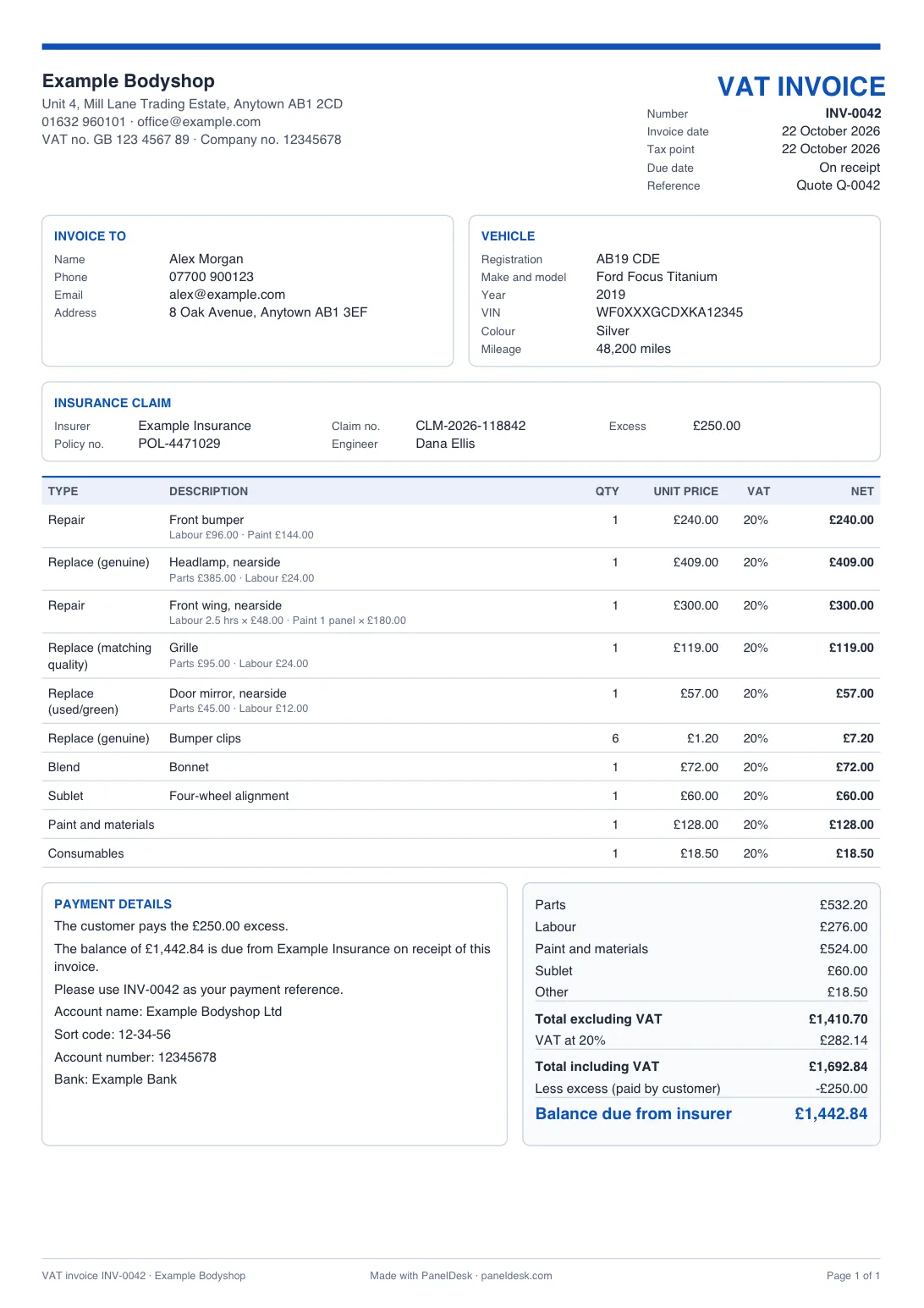
A VAT invoice with everything HMRC asks for: parts, labour, paint and VAT added up, your bank details, and one invoice for insurance jobs that shows the excess and the balance due from the insurer. Download a PDF with your logo. Free, no sign-up.
Not VAT registered? Tick one box and the invoice shows no VAT.
Invoice maker
Make your bodyshop invoice
Already made the quote? Use the quote template and press Turn this quote into an invoice.
Loading the builder...
What's on the invoice
A VAT invoice built for bodyshops
Everything HMRC asks for
A unique invoice number, your VAT number, the invoice date and tax point, the customer's name and address, and for each line the quantity, unit price, VAT rate and net amount.
Insurance jobs on one invoice
Turn on Insurance job and the invoice ends with the total, less the excess your customer pays, and the balance due from the insurer.
Business customers who pay the VAT
When a VAT-registered customer reclaims the VAT, the insurer usually pays only the net amount. Tick one box and the invoice shows the customer paying the excess and the VAT.
Bodyshop lines
Parts, labour, paint and sublet on each line, typed in or worked out from your rates, or one price for paint and materials, consumables, recovery and storage.
Bank details and due date
When payment is due, and your account name, sort code and account number, with the invoice number as the payment reference.
Nothing uploaded
Made in your browser. Your bodyshop's details, logo, rates and invoice numbers are saved on your device for next time. The invoice itself isn't kept.
Invoices straight from the job card
In PanelDesk the invoice is made from the job card with every line already on it, you see when the customer opened it, record payments as they come in, and know what's outstanding without a spreadsheet.
Good practice
What a VAT invoice must show
HMRC's list for a full VAT invoice. The template puts all of it on yours.
On every full VAT invoice
- A unique invoice number that follows on from the last one
- Your bodyshop's name, address and VAT registration number
- The invoice date, and the time of supply (tax point) if it's different
- Your customer's name and address
- A description of each part and repair
- For each line: the quantity, the unit price and the amount excluding VAT, and the VAT rate
- The total excluding VAT and the total VAT, in pounds
Insurance jobs: one invoice
The repair is for your customer, so the invoice is addressed to them. The customer pays the excess and the insurer pays the balance, and one invoice shows how the bill splits.
Rounding and when to invoice
HMRC lets you round the VAT on an invoice down to a whole penny, which the template does. Issue a VAT invoice within 30 days of the tax point.
Based on HMRC's VAT guide (VAT Notice 700) and its insurance guidance (VAT Notice 701/36). This is a guide, not tax advice: ask your accountant about your own business.
Prefer a file?
Invoice template in Word, Excel or PDF
The same layout on A4, to fill in on your computer or by hand, with your bodyshop's details, logo and bank details already on them.
Put your details on the templates
Add your bodyshop's name, contact details, VAT number and logo, and every file below has them filled in. They stay on this device.
Excel
A invoice spreadsheet that adds up the lines, the VAT, the excess and the insurer's balance for you. Opens in Excel, Google Sheets and Numbers.
Word
The same invoice as a Word document. Word doesn't add up, so work out the totals yourself or use the builder above.
Blank to print
A blank A4 invoice with lines to fill in by hand, including the excess and the insurer's balance.
FAQ
Bodyshop invoice questions
Quick answers about VAT invoices, the excess and the free template.
Yes, with no sign-up. Each PDF has a small "Made with PanelDesk" line at the bottom.
HMRC's VAT guide lists it: a unique invoice number that follows on from the last, your name, address and VAT number, the invoice date and the time of supply (tax point) if it's different, the customer's name and address, a description of each item, its quantity, unit price, VAT rate and amount excluding VAT, the total excluding VAT and the total VAT. The template prints all of it.
Yes. Tick Not VAT registered under Your bodyshop: the invoice is titled Invoice, shows no VAT and no VAT number, and adds up to the total you charge. Only a VAT-registered business may charge VAT.
Turn on Insurance job and enter the excess. The invoice goes to your customer, who the repair is for, and ends with the total including VAT, less the excess the customer pays, and the balance due from the insurer, so one invoice covers the whole job.
A business or fleet customer that can reclaim VAT usually pays the VAT themselves, and the insurer pays only the amount before VAT, less the excess. Tick The customer pays the VAT, and the invoice shows the customer paying the excess and the VAT and the insurer the rest.
20% of the total after any discount. HMRC lets you round the VAT on an invoice down to a whole penny, and the template does.
The time of supply, which decides which VAT return the invoice belongs to. For a repair it's usually the day you finish the work, but if you issue the invoice within 14 days of that, the invoice date becomes the tax point. So leave it as the invoice date, unless you're invoicing more than 14 days after you finished.
Then the customer pays the whole bill and the insurer owes nothing. The invoice caps the excess at the insurer's share, and the builder tells you it did.
Yes. In the free quote template, press Turn this quote into an invoice and everything carries across to this page on the same device.
Yes: add your account name, sort code and account number under Bank details, and they print on every invoice with the invoice number as the payment reference. Leave them blank if customers pay by card.
No. The invoice is made in your browser. Your bodyshop's details, logo and settings are saved on your device only, and the invoice itself is cleared when you close the tab. You can clear everything with Forget my details.
PanelDesk
Invoices that make themselves
PanelDesk makes the VAT invoice from the job card, tracks when it was opened, records payments and shows what's outstanding, all in one place with your quotes and job cards.
- Invoice from the job card
- Payments and balances tracked
- Quote, job card and invoice in one place
30 days free. No card, nothing to install.